Documentation
Getting Started
Requirements
- Node.js
>= 20 - npm
Install
npm install nanvc
Module Format
nanvc is published as an ESM-only package.
If your application is already using TypeScript with ESM, you can import directly:
import VaultClient, { VaultClientV2 } from 'nanvc';
If you are in a CommonJS project, use dynamic import().
Example:
async function main() {
  const { default: VaultClient, VaultClientV2 } = await import('nanvc');

  const vault = new VaultClient('http://127.0.0.1:8200', process.env.VAULT_TOKEN ?? null);
  const secretResponse = await vault.read('/secret/my-app/my-secret');

  if (!secretResponse.succeeded) {
    throw new Error(secretResponse.errorMessage ?? 'Vault read failed');
  }

  const vault2 = new VaultClientV2({
    clusterAddress: 'http://127.0.0.1:8200',
    authToken: process.env.VAULT_TOKEN ?? null,
  });

  const secret = await vault2.read('secret/my-app/my-secret').unwrap();
}

main().catch((error) => {
  console.error(error);
  process.exit(1);
});
Choosing a Client
Development focus: New development is focused on
VaultClientV2. The originalVaultClientremains available for compatibility, but it is expected to be deprecated and removed in a future major release.
VaultClient
Use VaultClient if you want the original API shape based on command specs and VaultResponse.
Good fit when:
- you want compatibility with the existing API
- you are already using the original client in production
- you prefer a single response object with
succeeded,apiResponse, anderrorMessage
VaultClientV2
Use VaultClientV2 if you want a more typed and explicit API.
Good fit when:
- you prefer
[data, error]result tuples - you want tuple helpers like
.unwrapOr()and.intoErr() - you want stronger typing for supported operations
- you want direct access to
RawVaultClientfor lower-level operations
Configuration
Both clients can read defaults from environment variables.
Original client
VaultClient uses:
NANVC_VAULT_CLUSTER_ADDRESSNANVC_VAULT_AUTH_TOKENNANVC_VAULT_API_VERSION
Fallbacks:
- cluster address:
http://127.0.0.1:8200 - auth token:
null - API version:
v1
V2 client
VaultClientV2 and RawVaultClient use:
NANVC_VAULT_CLUSTER_ADDRESSNANVC_VAULT_AUTH_TOKENNANVC_VAULT_API_VERSION
Fallbacks:
- cluster address:
http://127.0.0.1:8200 - auth token:
null - API version:
v1
TLS and mTLS
Both clients support HTTPS with optional TLS configuration.
Supported TLS options:
cacertkeypassphraserejectUnauthorized
Example:
import VaultClient from 'nanvc';

const vault = new VaultClient({
  clusterAddress: 'https://vault.local:8200',
  authToken: process.env.VAULT_TOKEN ?? null,
  tls: {
    ca: process.env.VAULT_CA_PEM,
    cert: process.env.VAULT_CLIENT_CERT_PEM,
    key: process.env.VAULT_CLIENT_KEY_PEM,
    passphrase: process.env.VAULT_CLIENT_KEY_PASSPHRASE,
    rejectUnauthorized: true,
  },
});
import { VaultClientV2 } from 'nanvc';
const vault = new VaultClientV2({
clusterAddress: 'https://vault.local:8200',
authToken: process.env.VAULT_TOKEN ?? null,
apiVersion: 'v1',
tls: {
ca: process.env.VAULT_CA_PEM,
cert: process.env.VAULT_CLIENT_CERT_PEM,
key: process.env.VAULT_CLIENT_KEY_PEM,
passphrase: process.env.VAULT_CLIENT_KEY_PASSPHRASE,
rejectUnauthorized: true,
},
});Minimal Example
These examples assume Vault is already initialized, unsealed, and reachable by the application with a token that can access the target secret path.
import VaultClient from 'nanvc';

const vault = new VaultClient('http://127.0.0.1:8200', process.env.VAULT_TOKEN ?? null);

async function main(): Promise<void> {
  const writeResponse = await vault.write('/secret/my-app/my-secret', { foo: 'my-password'});

  if (!writeResponse.succeeded) {
    throw new Error(writeResponse.errorMessage ?? 'Vault write failed');
  }

  const secretResponse = await vault.read('/secret/my-app/my-secret');

  if (!secretResponse.succeeded || !secretResponse.apiResponse) {
    throw new Error(secretResponse.errorMessage ?? 'Vault read failed');
  }

  const secret = secretResponse.apiResponse as { data?: { foo?: string } };

  console.log(secret.data?.foo);
}

main().catch(console.error);
import { VaultClientV2 } from 'nanvc';
const vault = new VaultClientV2({
authToken: process.env.VAULT_TOKEN ?? null,
});
async function main(): Promise<void> {
await vault.write('secret/my-app/my-secret', { foo: 'my-password' }).unwrap();
const secret = await vault.read<{ foo: string }>('secret/my-app/my-secret').unwrap();
}
main().catch(console.error);Logging
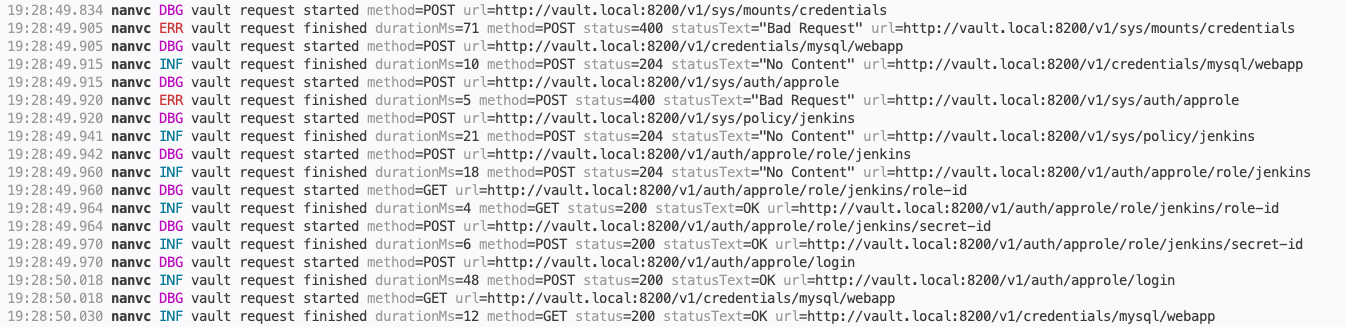
Logging is disabled by default. Set NANVC_LOG_LEVEL to enable request lifecycle logs:
NANVC_LOG_LEVEL=debug node app.js
Supported levels are error, warn, info, and debug. Logs include a local CLI-friendly timestamp, request method, URL, status, and duration, but not tokens or request/response bodies.
Log level prefixes are colorized when output is attached to a TTY. Set NANVC_LOG_NO_COLOR=1 to disable colors or NANVC_LOG_FORCE_COLOR=1 to force them.